Gamma AI Review 2025: The Ultimate Presentation Creator That’s Changing the Game
In this Gamma AI Review 2025, we dive deep into how this innovative platform is redefining presentation creation through advanced AI technology. In the rapidly evolving landscape of artificial intelligence tools, Gamma has emerged as a game-changing presentation creator that’s revolutionizing how we approach slide creation. This comprehensive Gamma AI review explores everything you need to know about this innovative platform, from its pricing structure to its powerful features that make it a formidable competitor to traditional presentation tools.
What is Gamma AI?

Gamma is an artificial intelligence-powered presentation tool that transforms the way users create engaging slide decks. Unlike traditional presentation software, this AI-driven platform allows users to generate professional presentations, documents, and web pages through simple text prompts. The gamma app leverages advanced AI technology to understand user intent and automatically create visually appealing content that would typically require hours of manual design work.
The platform represents a significant shift from conventional presentation creation methods, offering an intuitive approach that combines the power of artificial intelligence with sophisticated design capabilities. Whether you’re a business professional, educator, or creative individual, Gamma provides tools that streamline the entire presentation development process.
Key Features of Gamma AI
Whether you’re exploring AI tools for the first time or looking to upgrade, this Gamma AI Review 2025 covers the key features that set it apart.
Intelligent Content Generation
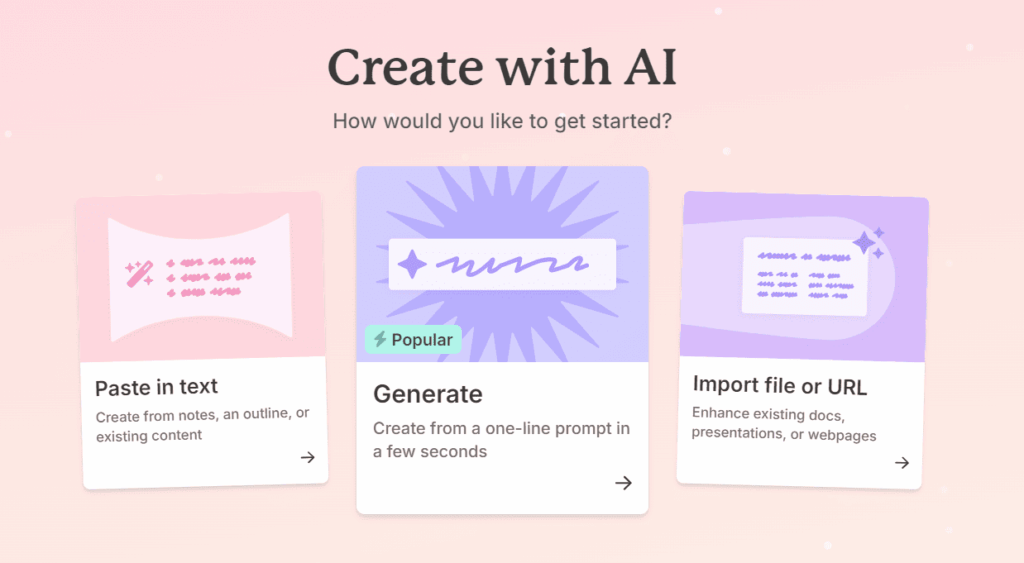
The gamma artificial intelligence system excels at transforming basic text inputs into comprehensive presentation materials. Users can describe their presentation needs in natural language, and the AI will generate structured content complete with relevant visuals, layouts, and design elements.
Advanced Design Capabilities
The gamma slides feature offers pre-designed templates that automatically adapt to your content. The AI analyzes your text and selects appropriate visual elements, color schemes, and layouts that enhance the overall presentation quality without requiring design expertise.
Multi-Format Support
Beyond traditional slide presentations, Gamma supports various content formats including documents, web pages, and interactive presentations. This versatility makes it an excellent choice for users who need to create different types of content within a single platform.
Real-Time Collaboration
The platform includes collaborative features that allow multiple users to work on presentations simultaneously. This functionality is particularly valuable for teams working on complex projects or organizations that require input from multiple stakeholders.
Gamma AI Pricing Structure
Before choosing a plan, it’s essential to understand the value Gamma provides. This Gamma AI Review 2025 breaks down what you get at each tier.Understanding the gamma ai pricing model is crucial for potential users considering this platform. Here’s a detailed breakdown of the available options:
| Plan | Price | Features | Best For |
| Free | $0/month | Basic templates, Limited exports, Watermark included | Individual users, Testing purposes |
| Plus | $10/month | Advanced templates, Unlimited exports, No watermark, Priority support | Small teams, Regular users |
| Pro | $20/month | Premium templates, Advanced analytics, Custom branding, API access | Professional teams, Businesses |
| Enterprise | Custom pricing | White-label options, Advanced security, Dedicated support, Custom integrations | Large organizations, Enterprise needs |
The gamma ai price structure offers flexibility for different user needs, from individual creators to large enterprises. The free tier provides an excellent opportunity to explore the platform’s capabilities before committing to a paid subscription.
How to Use Gamma AI: Step-by-Step Guide
Getting Started with Gamma AI Login
- Visit the official gamma.app website
- Click on the sign-up button to create your account
- Complete the gamma ai login process using your email credentials
- Choose your preferred pricing plan based on your needs
Creating Your First Presentation
- Access the gamma ai presentation creator from your dashboard
- Input your presentation topic or outline in natural language
- Select your preferred style and design preferences
- Allow the AI to generate your initial slide deck
- Review and customize the generated content as needed
Optimizing Your Gamma AI Slides
The platform’s AI capabilities extend beyond basic content generation. Users can refine their gamma ai slides by providing additional context, adjusting design elements, and incorporating specific branding requirements. The system learns from user preferences and improves its suggestions over time.
Gamma vs Canva: A Detailed Comparison
When comparing tools like Canva and Gamma, this Gamma AI Review 2025 helps highlight where Gamma truly stands out for productivity and ease of use.
Design Approach
Canva focuses on providing extensive design templates and manual customization options, while Gamma emphasizes AI-driven content generation and automatic design optimization. This fundamental difference affects how users interact with each platform.
Learning Curve
Gamma’s AI-powered approach significantly reduces the learning curve associated with presentation creation. Users can generate professional-quality presentations without extensive design knowledge, whereas Canva requires more manual input and design understanding.
Content Generation
The gamma ai ppt maker excels at creating structured content from minimal input, while Canva requires users to manually add and arrange content elements. This makes Gamma particularly appealing for users who struggle with content organization and structure.
Collaboration Features
Both platforms offer collaboration capabilities, but Gamma’s AI-enhanced features provide more intelligent suggestions during the collaborative process, making team projects more efficient.
Gamma AI vs Beautiful AI: Which is Better?
The gamma vs beautiful ai comparison reveals interesting distinctions between these AI-powered presentation tools:
AI Intelligence
Both platforms utilize artificial intelligence, but Gamma’s approach focuses more on content generation and structure, while Beautiful AI emphasizes design aesthetics and visual appeal. The choice depends on whether you prioritize content creation or visual design.
Template Variety
Beautiful AI offers a wider selection of professionally designed templates, while Gamma provides more flexibility in content adaptation and customization. Users seeking specific design styles might prefer Beautiful AI, while those prioritizing content generation may favor Gamma.
Ease of Use
The gamma presentation tool offers a more intuitive interface for content creation, making it accessible to users with varying technical backgrounds. Beautiful AI requires more design awareness but provides greater visual control.
Gamma AI Tools and Features Analysis
Content Intelligence
The gamma ai tools include sophisticated content analysis capabilities that help users create more engaging presentations. The AI can suggest relevant images, optimize text placement, and recommend design improvements based on content type and audience.
Export Options
Users can export their gamma ai deck in various formats, including PDF, PowerPoint, and web-based presentations. This flexibility ensures compatibility with different presentation environments and sharing requirements.
Integration Capabilities
The platform supports integration with popular productivity tools, making it easy to incorporate Gamma into existing workflows. This includes compatibility with cloud storage services, project management platforms, and communication tools.
Gamma AI Review: Pros and Cons
Advantages
- Rapid Content Creation: The AI significantly reduces time spent on presentation development
- Professional Quality: Generated presentations maintain high visual and content standards
- User-Friendly Interface: Intuitive design makes the platform accessible to users of all skill levels
- Flexible Pricing: Multiple pricing tiers accommodate different user needs and budgets
- Continuous Improvement: The AI learns from user interactions and improves over time
Limitations
- Internet Dependency: The platform requires stable internet connection for optimal performance
- Learning Period: New users may need time to understand how to effectively communicate with the AI
- Customization Constraints: Advanced users might find limited options for detailed customization
- Content Accuracy: AI-generated content may require fact-checking and refinement
Gamma AI Alternatives and Competitors
Presentation Software Alternatives
Several platforms compete with Gamma in the presentation creation space:
- Canva: Offers extensive design templates and manual customization options
- Beautiful AI: Focuses on automated design with emphasis on visual aesthetics
- Prezi: Provides non-linear presentation formats with dynamic transitions
- PowerPoint: Traditional presentation software with AI-enhanced features
Specialized AI Tools
Other gamma ai alternative options include:
- Tome: AI-powered storytelling and presentation platform
- Decktopus: Automated presentation creation with industry-specific templates
- Slidebean: AI-assisted design with focus on startup presentations
Advanced Features and Functionality
AI-Powered Design Suggestions
The gamma presentation creator continuously analyzes content and provides intelligent design recommendations. This includes color scheme optimization, layout adjustments, and visual element placement that enhances overall presentation effectiveness.
Content Optimization
The platform’s AI capabilities extend to content optimization, helping users refine their messaging for maximum impact. This includes suggestions for improving clarity, engagement, and persuasiveness based on presentation objectives.
Analytics and Performance Tracking
Advanced users can access detailed analytics about their presentations, including engagement metrics, viewing patterns, and audience feedback. This data helps users understand what works and refine their approach for future presentations.
Industry Applications and Use Cases
Business Presentations
Companies across various industries use Gamma for creating investor pitches, sales presentations, and internal communications. The platform’s ability to quickly generate professional-quality content makes it valuable for time-sensitive business scenarios.
Educational Content
Educators and trainers leverage Gamma’s capabilities to create engaging instructional materials, course presentations, and educational resources. The AI’s ability to structure information logically makes it particularly useful for educational applications.
Marketing and Sales
Marketing professionals use the gamma ai tool to create compelling presentations for campaigns, product launches, and client proposals. The platform’s design capabilities help create visually appealing materials that support marketing objectives.
Future Developments and Roadmap
Emerging Features
The Gamma development team continues to enhance the platform with new AI capabilities, including improved natural language processing, advanced design algorithms, and expanded integration options.
Technology Integration
Future updates are expected to include deeper integration with emerging technologies such as virtual reality, augmented reality, and advanced analytics platforms.
User Experience Improvements
Ongoing development focuses on streamlining the user experience, reducing learning curves, and providing more intuitive interaction methods with the AI system.
Best Practices for Using Gamma AI
Effective Prompt Writing
To maximize the effectiveness of the gamma ai presentation tool, users should provide clear, detailed prompts that include specific requirements, target audience information, and desired outcomes.
Content Refinement
While the AI generates impressive initial content, users should review and refine the output to ensure accuracy, relevance, and alignment with their specific needs and brand requirements.
Design Customization
Taking advantage of the platform’s customization options helps create presentations that stand out and align with organizational branding and style guidelines.
Frequently Asked Questions (FAQ)
What does Gamma AI do?
Gamma AI is an artificial intelligence-powered presentation creation platform that transforms text prompts into professional presentations, documents, and web pages. It automates the design process and generates structured content based on user input.
Is Gamma AI free?
Yes, Gamma offers a free tier that includes basic templates and limited export options. However, advanced features and unlimited usage require a paid subscription.
How does Gamma compare to PowerPoint?
While PowerPoint requires manual slide creation and design, Gamma uses AI to automatically generate presentations from text descriptions. This makes Gamma faster for initial creation but potentially less customizable for detailed adjustments.
Can I use Gamma for professional presentations?
Absolutely. Gamma’s AI generates professional-quality presentations suitable for business meetings, investor pitches, and corporate communications. The paid plans remove watermarks and provide additional professional features.
What file formats does Gamma support?
Gamma supports various export formats including PDF, PowerPoint (PPTX), and web-based presentations. This ensures compatibility with different presentation environments and sharing requirements.
How accurate is Gamma’s AI-generated content?
While Gamma’s AI is highly sophisticated, users should review and fact-check generated content to ensure accuracy and relevance to their specific needs and industry requirements.
Can multiple users collaborate on Gamma presentations?
Yes, Gamma includes collaboration features that allow multiple users to work on presentations simultaneously, making it suitable for team projects and organizational use.
What makes Gamma different from other presentation tools?
Gamma’s key differentiator is its AI-first approach to presentation creation. Instead of starting with blank slides, users describe their needs in natural language, and the AI generates complete presentations with appropriate content and design.
Conclusion
To wrap up this Gamma AI Review 2025, it’s clear that Gamma is not just another AI tool—it’s a strategic solution for anyone who values efficiency, design, and high-impact communication. This comprehensive Gamma AI review demonstrates that the platform represents a significant advancement in presentation creation technology. By combining powerful artificial intelligence with intuitive design capabilities, Gamma offers a compelling solution for users seeking to create professional presentations efficiently.
The platform’s strengths lie in its ability to rapidly generate high-quality content, reduce the time investment required for presentation creation, and provide professional results regardless of the user’s design expertise. While there are limitations regarding customization depth and the need for content verification, the overall value proposition makes Gamma an attractive option for many users.
Whether you’re a business professional, educator, or creative individual, Gamma’s AI-powered approach to presentation creation offers significant advantages over traditional methods. The flexible pricing structure ensures that users can find a plan that matches their needs and budget, while the continuous development of new features promises ongoing value.
As artificial intelligence continues to evolve, tools like Gamma represent the future of content creation, offering efficiency, quality, and accessibility that traditional presentation software cannot match. For users willing to embrace AI-powered tools, Gamma provides an excellent foundation for creating compelling presentations that engage audiences and achieve communication objectives.
The gamma app continues to evolve, incorporating user feedback and advancing AI capabilities to maintain its position as a leading presentation creation platform. As we move through 2025, Gamma’s commitment to innovation and user experience makes it a valuable tool for anyone serious about creating impactful presentations efficiently and effectively.